
Last updated July 23, 2026.
How it works
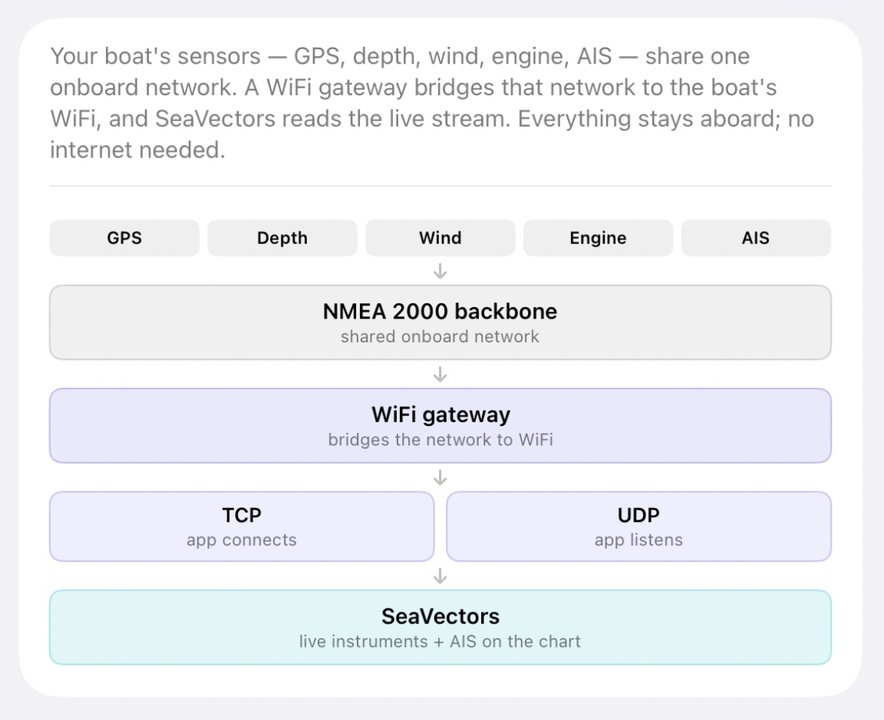
Your boat's sensors — GPS, depth, wind, engine, AIS — share one onboard
network. A WiFi gateway bridges that network to the boat's WiFi, and
SeaVectors reads the live stream. Everything stays aboard; no internet needed.
Want to connect SeaVectors to your boat and see live NMEA data in the app?
The 30-day free trial includes the complete experience, so you can evaluate SeaVectors with your own routes and equipment before deciding whether to subscribe.
- Download SeaVectors on the App Store
- Get SeaVectors on Google Play
- Not ready to install? Open the lightweight web chart for a quick preview.
Connecting
| TCP | Enter the gateway's host and port. Reliable and ordered; gateways limit how many apps can connect at once. |
| UDP | The gateway broadcasts to the whole network and the app just listens on the port — no host needed, unlimited devices. |
| Common ports | 10110 (B&G, Simrad, Lowrance, ShipModul) · 2000 (Digital Yacht) · 1456 (Yacht Devices) · 39150 (Vesper) |
| Format is automatic | NMEA 0183 and raw NMEA 2000 (Yacht Devices RAW, $PCDIN, $MXPGN) are detected automatically — nothing to configure. |
Data formats
| NMEA 0183 | The classic marine text format. Universally supported; carries position, depth, wind, heading, AIS and more. |
| NMEA 2000 (raw) | Read directly from the boat's data bus via Yacht Devices RAW, $PCDIN (SeaSmart) or $MXPGN (ShipModul). Adds instance-aware data 0183 can't carry — twin engines, multiple batteries and tanks. |
| Standards-tested | Decoding is verified against the NMEA 2000 PGN standard, reference tools, and real device output from Yacht Devices, Actisense and others. |
WiFi gateways
| Device | Notes | Format |
|---|---|---|
| Yacht Devices YDWG-02 | TCP or UDP, default port 1456. Serves NMEA 0183 and raw NMEA 2000 on separate ports at the same time. | NMEA 2000 (Yacht Devices RAW) + NMEA 0183 |
| Digital Yacht WLN10 / NavLink2 | TCP or UDP, port 2000. NavLink2 converts the NMEA 2000 bus to 0183. | NMEA 0183 |
| Actisense W2K-1 / W2K-2 | TCP or UDP, three configurable data servers. Its raw NMEA 2000 framing isn't read yet — run it in 0183 mode. | NMEA 0183 |
| ShipModul MiniPlex-3Wi | Port 10110, UDP by default. The 3Wi-N2K model also bridges the NMEA 2000 bus. | NMEA 0183 · NMEA 2000 ($MXPGN) on the 3Wi-N2K |
| Quark-elec QK-A032 | TCP, port 2000. NMEA 2000 ↔ 0183 gateway. | NMEA 0183 or NMEA 2000 ($PCDIN) |
| Signal K / OpenPlotter | TCP, port 10110. Configure it to emit raw PGNs for NMEA 2000. | NMEA 0183 · NMEA 2000 (Yacht Devices RAW / $PCDIN) |
Any gateway that serves NMEA data over TCP or UDP works — these are the
common ones.
AIS transponders with WiFi
| Device | Notes | Format |
|---|---|---|
| Vesper XB-8000 / Cortex | TCP, port 39150. AIS, GPS and instrument data. | NMEA 0183 |
| em-trak B952 / B954 | AIS and GPS data over WiFi. Doesn't convert NMEA 2000 instrument data. | NMEA 0183 (AIS + GPS) |
Chartplotters
| Device | Notes | Format |
|---|---|---|
| B&G Zeus / Vulcan · Simrad NSS, NSO, GO · Lowrance HDS, Elite | Enable “NMEA 0183 over WiFi” in the plotter's network settings, port 10110. | NMEA 0183 |
Garmin, Raymarine, Furuno, Humminbird
These plotters don't share NMEA data over WiFi with third-party apps. Add any
WiFi gateway above to the boat's NMEA 2000 backbone — it hears every sensor
directly, and the plotter keeps working unchanged.
What SeaVectors reads from NMEA 2000
| Navigation | Position, course & speed over ground, heading, rate of turn, heel & pitch. |
| Depth & speed | Water depth, speed through water, trip and total log. |
| Wind & environment | True and apparent wind, water & air temperature, barometric pressure with trend. |
| Engine & electrical | RPM, coolant temperature, engine hours, fuel rate, battery voltage & state of charge, fuel and water tank levels — per engine, battery and tank. |
| AIS traffic | Nearby vessels' position, course, speed, name, callsign and size — ranked by collision risk on the chart and in the AIS list. |
Instance-aware: twin engines, multiple battery banks and several tanks each
get their own reading.
Next steps
Check the full NMEA Device Compatibility Reference, then use the connection steps above for setup and troubleshooting.